No description
 Christine Elisabeth Koppel
dcdc5f8819
Christine Elisabeth Koppel
dcdc5f8819

All checks were successful
Build Nix modules (dry-run) / build-modules (push) Successful in 4m5s
|
||
|---|---|---|
| .forgejo/workflows | ||
| .idea | ||
| docs | ||
| nix-system-configs | ||
| src | ||
| .gitignore | ||
| .sops.yaml | ||
| Cargo.lock | ||
| Cargo.toml | ||
| documentation_titlepage.md | ||
| dry_run.zsh | ||
| flake.lock | ||
| flake.nix | ||
| img.png | ||
| LICENSE | ||
| README.md | ||
| secrets.md | ||

Title
If you want to see proper documentation, please visit the documentation page.
The following repository is also mirrored at the local PRG git or at Codeberg:
- https://git.prg-radio.org/root/the_prg_server_configuration
- https://codeberg.org/polyteknisk-radiogruppe/the_prg_server_configuration
Hewo :3 - you have found the Polyteknisk Radiogruppe's NixOS configurations of our server, feel free to poke holes at it, as security through obscurity isn't really security. Like don't be a douche poking holes, but be nice, do not ruin it if you were on the other side, silliness is okay, but consent is best.
TODO HECK
- Do a massive overhaul of the file structure, like there should be like modules where it is possible to call things to be packages. I.e. Calling the OVMF/SeaBIOS + Gnome/Plasma/Sway + Local changes, which two former would be separate .nix files. -> Probably will do a V3 or v2.1 later on when mature
- Add the .env for the configurations so that we add the
git config --global user.email "you@example.com"andgit config --global user.name "Your Name"with the account custom made for this. - Clean up the hanging configurations -> PiHole DNS Stuff needs to be transferred over elegantly, don't want to touch it unless I am myself en-site.
- Find a more clean way to store initial passwords (.env??) -> nix-sops
- Create proper build automation scripts -> Needs to be properly done.
- Attach more NixOS weblinks...
- Update Forgejo Styling
- Figure out what the hecc to do with SSL Certifications in the most elegant way -> Use Traefik
- Add Git Actions to Forgejo -> It was already added, just need to setup the CI itself.
- Setup the CI backend.
- Create the Podman x Portainer NixOS module -> See
Songsheet - Read up more about how to a backup machine stuff and making it Nix-y...
- Figure out my life
- Setup Hardware Keys
- Setup a VPN
- Setup Alejandra pre-commit hook
NOTES FOR FUTURE
ServiceException: 401 Anonymous caller does not have storage.objects.list access to the Google Cloud Storage bucket. Permission 'storage.objects.list' denied on resource (or it may not exist).
You need to run
sudo gcloud init
sudo gcloud auth activate-service-account --key-file /run/secrets/gcloud_bucket
Cheesus Crust, document this plz Google, whyyyyyyyyy
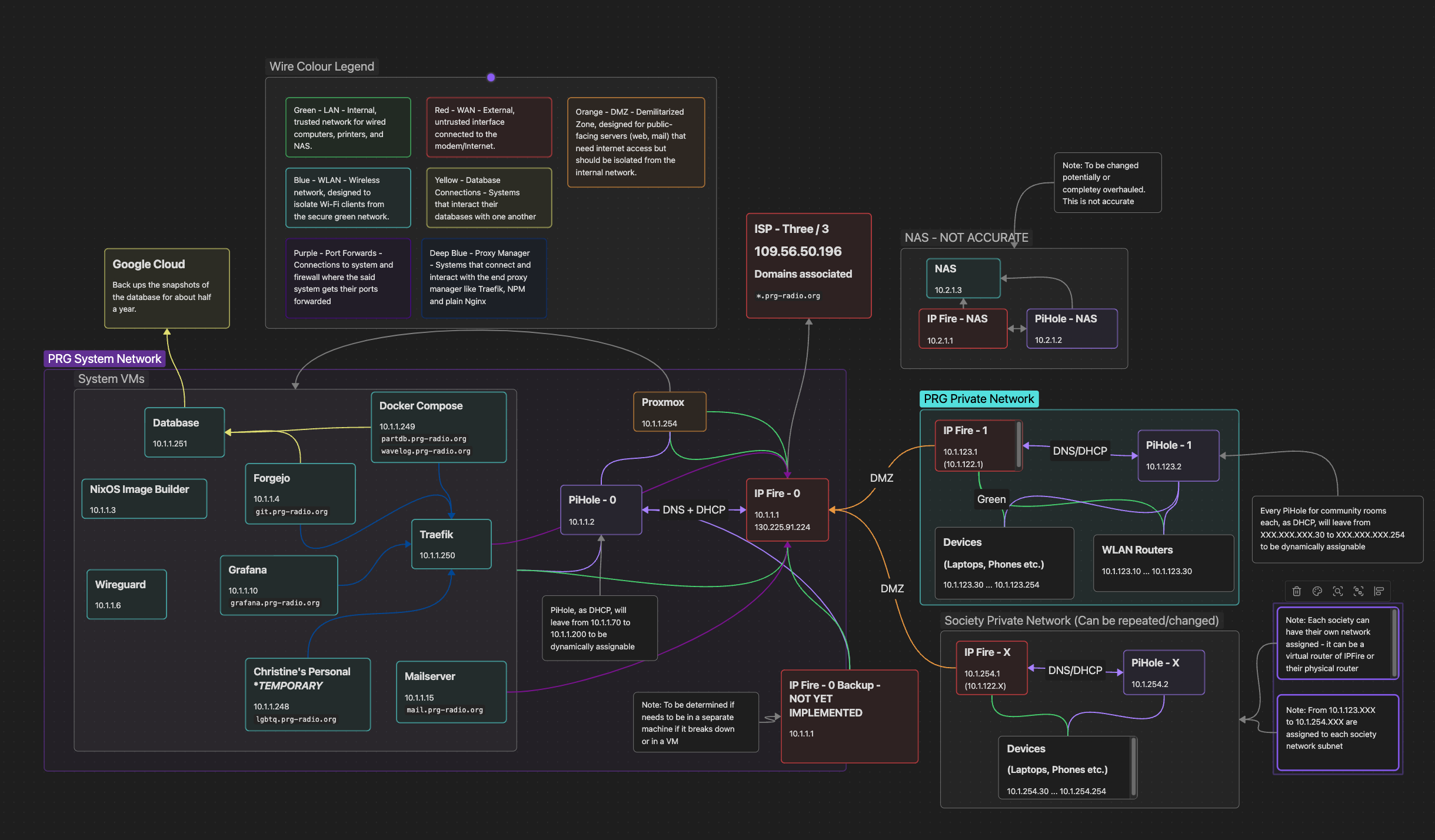
Current Layout as of 2026-02-17